Complete Guide to USSD and Diagnostic Codes
In today’s smartphone-driven world, knowing how to check your mobile phone’s status is essential for maintaining performance, ensuring security, and verifying authenticity. One of the fastest ways to do this is by using mobile checking codes — also known as USSD codes or diagnostic codes. These short numeric commands help you access hidden menus, run system tests, and verify important device information without installing any additional app.
In this article, we’ll cover:
-
What is a mobile checking code?
-
How mobile checking codes work
-
Most useful codes for Android and iOS
-
Benefits of using these codes
-
Safety tips when using USSD codes
What is a Mobile Checking Code?
A mobile checking code is a combination of numbers, symbols, and special characters that you enter in your phone’s dialer to retrieve information or run a function. These codes are usually pre-programmed by device manufacturers or network operators and work without an internet connection.
These codes fall under two main categories:
-
USSD Codes (Unstructured Supplementary Service Data) – Used for network-related functions such as balance checks, SIM details, and mobile data usage.
-
MMI Codes (Man-Machine Interface) – Used for hardware and system diagnostics, such as checking the IMEI number, testing sensors, or displaying battery health.
How Mobile Checking Codes Work
When you dial a code like *#06#, your phone sends a request to the device’s internal system or to your mobile network provider’s servers.
-
If it’s a device-side code, your phone processes the request and displays the result instantly.
-
If it’s a network-side code, the request is sent to your mobile carrier, which then returns the relevant information.
These codes are especially valuable because they:
-
Work offline (for device tests)
-
Don’t require apps
-
Save time by avoiding complex menu navigation
Most Common and Useful Mobile Checking Codes
Here’s a list of high-utility codes for mobile checking that work on most devices:
1. IMEI Number Check
-
Code:
*#06# -
Function: Displays your phone’s unique International Mobile Equipment Identity (IMEI) number.
-
Why it’s important: IMEI is essential for phone warranty claims, unlocking services, and tracking lost devices.
2. Phone Information and Diagnostics
-
Android Code:
*#*#4636#*#* -
Function: Opens a hidden menu showing battery health, usage statistics, and mobile network information.
-
Uses: Ideal for troubleshooting slow networks or poor signal reception.
3. Hardware Test Menu
-
Samsung Code:
*#0*# -
Function: Tests display colors, touch screen, vibration, camera, speaker, and sensors.
-
Benefit: Quickly detect hardware issues without visiting a repair shop.
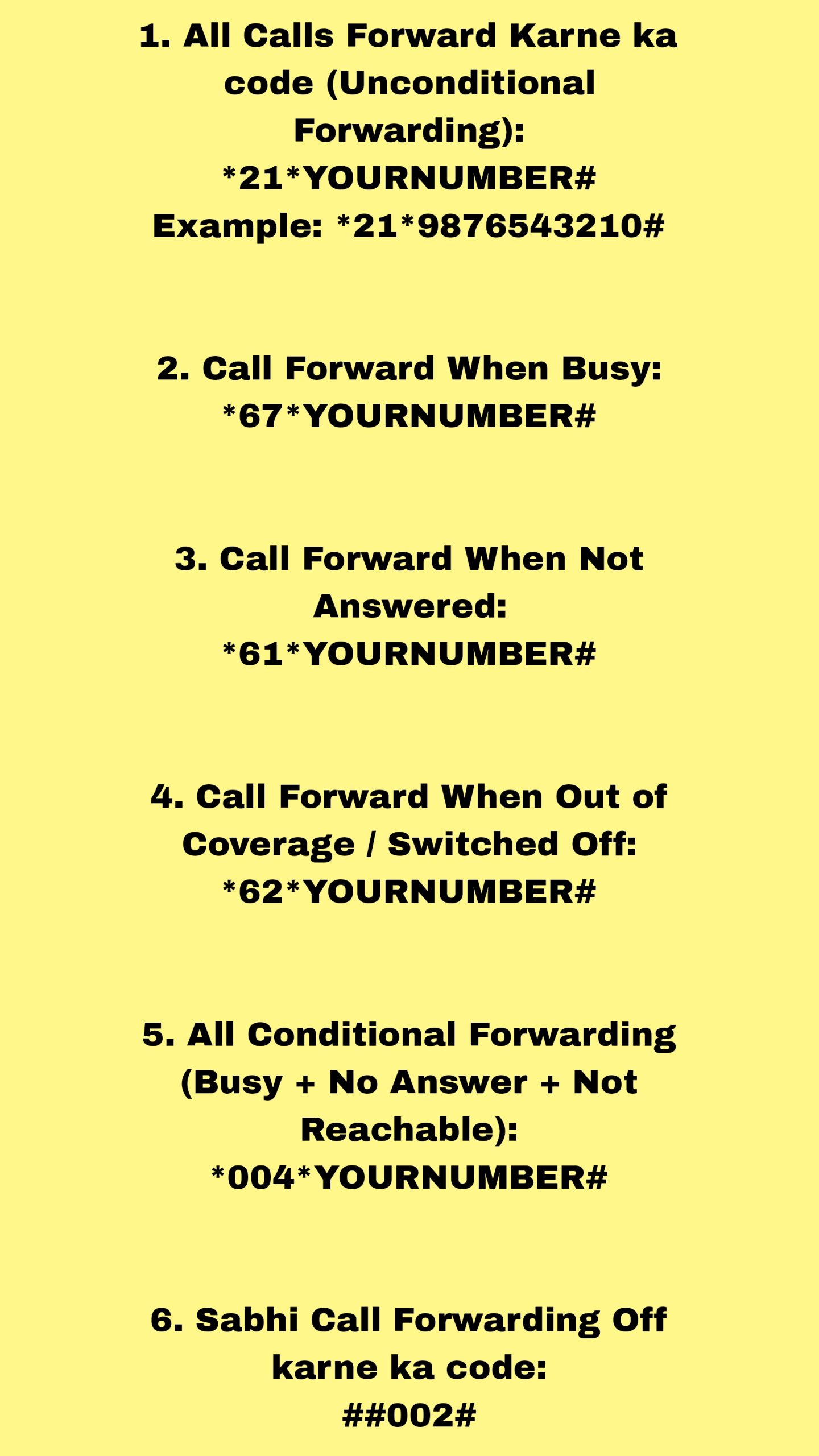
4. Call Forwarding Status
-
Code:
*#21# -
Function: Shows whether your calls, messages, or data are being forwarded.
-
Security tip: Use this to check for potential phone tapping or call redirection scams.
5. Data Usage & Balance Check
-
Example for Many Networks:
*111#or*123# -
Function: Displays your remaining balance, data, and validity.
-
Note: Varies by mobile carrier.
6. Software Version Check
-
Code:
*#1234#(Samsung) /*#9999# -
Function: Shows your firmware version.
-
Why it matters: Helps in verifying software updates and compatibility before installing apps.
Benefits of Using Mobile Checking Codes
Using mobile checking codes provides multiple advantages:
1. Quick Access to Information
No need to navigate through complicated settings. A simple code gives instant results.
2. Device Security
Check for unauthorized call forwarding, SIM card registration, and suspicious activities.
3. Warranty and Service Verification
Having your IMEI and software version handy speeds up support and warranty claims.
4. Network Troubleshooting
Test signal strength, SIM registration, and network modes without downloading extra tools.
Safety Tips When Using Mobile Checking Codes
While most codes are safe, some can alter system settings. Here’s how to stay safe:
-
Avoid Unknown Codes: Some factory reset codes can erase your data instantly.
-
Test in Safe Conditions: Run diagnostics when your phone is idle.
-
Backup Data: In case a code triggers a reset, you won’t lose important files.
-
Use Trusted Sources: Only get codes from reliable tech blogs or official support pages.
Frequently Asked Questions (FAQ)
Q1: Do mobile checking codes work on all phones?
Not all codes are universal. Some are brand-specific or carrier-specific.
Q2: Can these codes harm my phone?
Diagnostic codes are generally safe, but service codes that modify settings can be risky if misused.
Q3: Do I need internet for USSD codes?
No, most codes work offline, except those that require network data from your carrier.
Conclusion
Knowing the right code for mobile checking can save you time, protect your device, and help you troubleshoot problems effectively. Whether you need to verify your IMEI, check for call forwarding, or run a hardware test, these codes offer a fast and free solution.
Just remember: Use codes wisely and only from trusted sources to avoid unintentional changes to your phone’s configuration. With the right knowledge, you can keep your device in top condition and ensure your personal data stays safe.